

Inventory movement and adjustments
Handle stock in, stock out, damage, expiry tracking, and cost-aware inventory changes across locations.
Track inventory & stock movements
Watch on YouTube1. Inventory Workbench
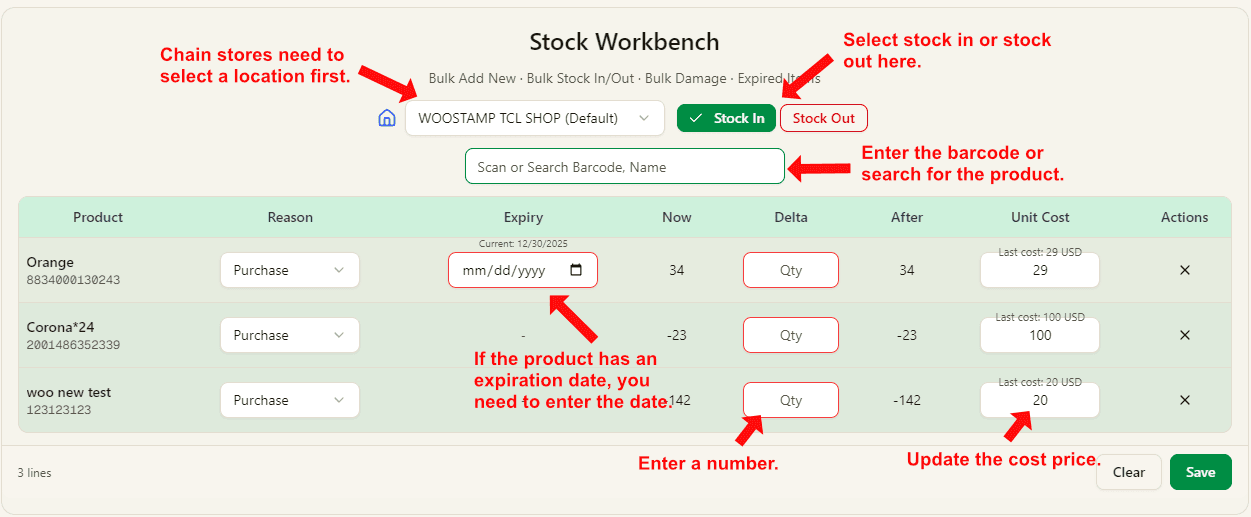
- For chain stores, select the location first and then work on stock movements for that location.
- Choose Stock In or Stock Out before scanning or searching products.
- Use barcode input or product search to add items into the stock workbench table.
- If an item has expiry management, enter the expiration date before saving.
- Enter the quantity change in Delta, and verify the Now and After values.
- Update Unit Cost when needed, then click Save to complete the inventory update.