
1. Staff Setup and Permissions

  • Set Staff ID, PIN, role, and active status when creating or editing staff accounts.
  • For chain stores, assign the employee to the correct work location first.
  • Configure POS permissions per staff, such as refund, discount, inventory, stocktake, and product actions.
  • Use role and permissions together to control exactly what each staff member can do in POS.
  • Paid plans support unlimited staff accounts and unlimited device logins.
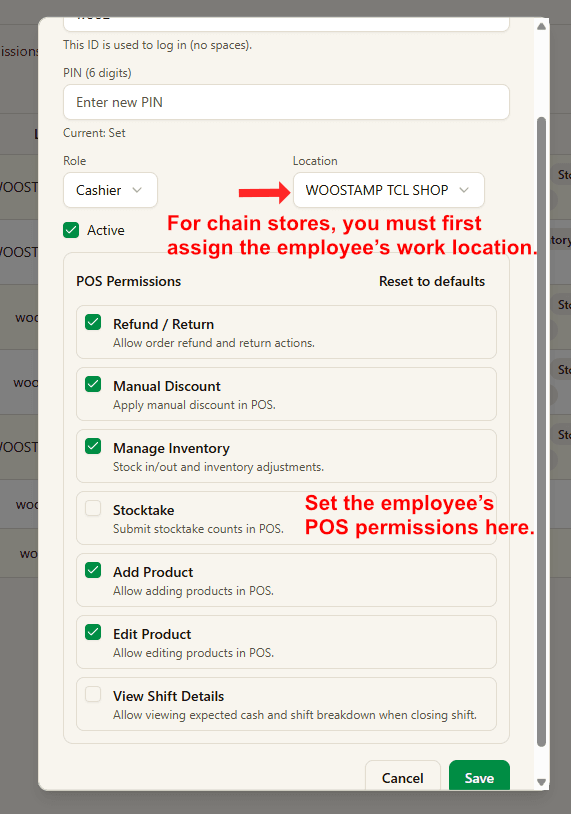
Staff setup and POS permissions
Related Pages

Explore the full retail POS setup

Compare POS features, Windows POS, Android POS, tutorials, and contact guidance so you can choose the right setup for your store.

Features

POS Features

Explore Good Cashier POS features for sales, inventory, barcode printing, staff permissions, stocktake, VIP loyalty, locations and chain store operations.

Open POS Features

Windows POS

Windows POS

Use a Windows POS system on family PCs, old desktops or shop computers with barcode scanners, receipt printers and easy store management.

Open Windows POS

Android POS

Android POS

Run Android POS selling flows on tablets and mobile devices with barcode scanning, VIP checkout, wallet payment and flexible cashier workflows.

Open Android POS

Contact

Contact

Contact Good Cashier about Windows POS, Android POS, inventory migration, barcode printing, retail setup and multi-store rollout planning.

Open Contact
Staff accounts and permissions | Good Cashier POS Tutorial